
What is Protobject
Find out what Protobject is and how to start programming.
Introduction
Protobject uses the concept of physical computing, which allows you to interact with the physical world in a simple and immediate way, enabling the creation of projects that solve real-world problems. Unlike other physical computing platforms, you don't need electronics knowledge or expensive devices, as Protobject exclusively uses smartphones. Protobject offers users the opportunity to acquire technological skills in an easy, simple, and fun way through a user-friendly web interface and a wide range of activities that can be performed without the need for electronic devices.
Devices
Features
Protobject allows you to transform smartphones into 25 different devices that can be programmed as needed.
-

Lamp
An on-screen lamp that changes color.
-
Switch
On/Off buttons on the screen.
-
TouchButton
An on-screen touch button.
-
Knob
A simple rotating knob (values from 0 to 100).
-

7x7Draw
Draw on a 7x7 display.
-
WriteDraw
Write and draw on the screen and add interactive areas.
-
DataRecorder
Record data to export to Google Sheets or Excel.
-

AudioPlayer
Play audio from YouTube.
-

NoiseLevel
Detect the noise level with the microphone.
-

MusicalKeyboard
Play notes on a keyboard.
-
MusicalDrum
Play notes on a drum set.
-
Motion
Detect device movements with the accelerometer.
-
Inclination
Detect device inclination with the accelerometer.
-

Direction
Use the smartphone as an aerial pointer.
-

Compass
Use the smartphone as a compass.
-
Vibrator
Make your device vibrate.
-

CameraMotion
Detect motion intensity with the camera.
-

LightIntensity
Detect light intensity with the camera.
-

SmartCamera
Recognize custom images with the camera.
-

MarkerDetector
Track printable markers in the environment.
-

SpeechRecognition
Recognize voice with the microphone.
-
Text2Speech
Make your device speak.
-
GPSData
Detect position, speed, and altitude with GPS.
-
ProtoArduino
Extend Protobject to Arduino inputs and outputs.
-

ProtoRobot
A simple 3D-printed robot with Arduino.
Programming
The devices can be programmed with Protobject using Blockly, a visual programming language. For example, the program below is a traffic light that, in a loop:
- Turns the light green.
- Waits six seconds.
- Turns the light yellow.
- Waits one second.
- Turns the light red.
- Waits six seconds.
We recommend you follow the first tutorial to get familiar with Protobject. Additionally, you can explore the educational activities designed for Protobject.
Offline Version
The offline version of Protobject is ideal for schools that do not have an internet connection or prefer not to use one. It works via a local router, allowing students to connect and use the Protobject platform without internet access. For more information, feel free to contact us.
Physical Kit
Protobject is primarily designed to work on smartphones without the need for additional hardware. However, we have developed a physical kit for Protobject that allows you to use the platform with an Arduino or a simple robot for those who wish to experiment with these components.
ProtoArduino
Protobject has a device called ProtoArduino that allows you to use an Arduino Leonardo as an input and/or output by connecting it to the smartphone's USB port. To use this device, you need to program an Arduino Leonardo with our firmware. Once programmed, it can be used without needing to install any application on the phone or computer; everything works through the Protobject web interface.
The ProtoArduino device offers blocks for:
- Reading three analog inputs and three digital inputs from the Arduino (on pins A1, A2, A3 and D7, D8, D9).
- Controlling up to two servo motors (D5 and D6).
- Controlling three digital PWM pins (D3, D11, and D13).
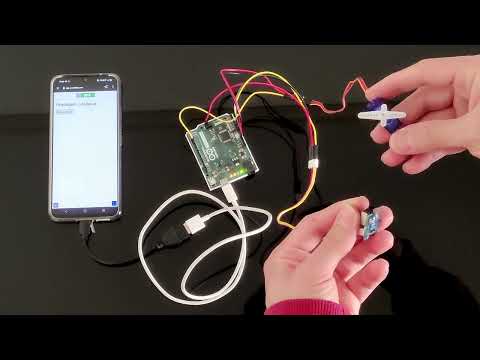
This allows you to virtually extend Protobject with dozens of sensors and actuators compatible with Arduino. The following video shows how to control a servo motor using a potentiometer and displays the set of blocks used to program this example.
ProtoRobot
Another device within Protobject is called ProtoRobot. This device allows you to control a 3D-printed robot, and, like everything in Protobject, it works via a smartphone mounted directly on the robot. ProtoRobot uses an Arduino Leonardo to control two servo motors that enable its movement. To use ProtoRobot, it connects to the smartphone via its USB port. As with ProtoArduino, once programmed with our firmware, there is no need to install any application on the phone or computer. Everything works through the same Protobject web interface.
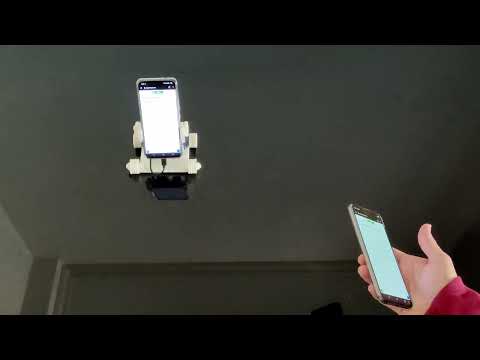
Below is a video and the code for an example of using ProtoRobot, which can be controlled by tilting the smartphone. (For this purpose, the device that detects phone inclinations is used).
Components
The firmware required for ProtoArduino to work is the same used for ProtoRobot. In other words, once an Arduino Leonardo is programmed with this firmware, the device can be used in both ways:
- As a controller for Arduino inputs and outputs
- To control ProtoRobot
The Protobject physical kit consists of the following components:
General Components:
- 1 Arduino Leonardo
- 1 USB-C to USB Nano cable (or other to connect the smartphone to the Arduino)
- Firmware for Arduino Leonardo
Specific Components for ProtoArduino:
- 1 Arduino holder (optional, for greater convenience during development)
Specific Components for ProtoRobot:
- Robot base
- 2 front wheels
- 2 rear wheels
- 2 wheel nuts
- 1 smartphone holder
- 2 smartphone clips
- 2 smartphone nuts
- 2 FS90R continuous servo motors
- 1 female-to-female cable
- 3 male-to-male cables
- 4 small rubber bands
- 2 medium rubber bands (optional, to make the robot work on uneven surfaces)